


Sintra: AI Employees
4.391.00 Reviews
App Specs
- Version
- 2.10.0
- Updated On
- License
- Free
- Downloads
- 10,000+
- Developer
- sintra.ai
- Categories
- Business
- Platform
- Android
Screenshots
 Analysis by AppCompare
I tend to judge a work assistant by one practical question: does it help me finish a real task, or does it add another place to manage? Sintra: AI Employees is built around the idea of assigning work to role-based AI helpers, rather than opening a blank chatbot for every request. That approach could be useful when the same kinds of tasks keep landing on your plate, but it also makes clear instructions and careful checking part of the routine.
Why role-based helpers can change the workflow
Sintra is a business app from sintra.ai, and its central appeal is the idea of dividing work among assistants with different purposes. In everyday use, that framing can make it easier to decide where to start: instead of asking one general tool to do everything, you can think in terms of the job at hand, such as organizing information or helping with routine communication. The benefit is less about having a digital “team” in the literal sense and more about giving recurring tasks a consistent starting point.
That distinction matters if you already use general-purpose AI tools. A blank prompt box is flexible, but it asks you to invent the role, context, and output format each time. A role-oriented setup can reduce that repeated setup work. It does not remove the need to explain the task or review the result, though. I would treat the assistant’s output as a draft or a first pass, especially when it touches customer communication, business figures, or decisions that affect other people.
Making the first task small and useful
When trying a work assistant, I recommend starting with a task that is frequent, low-risk, and easy to judge. For example, ask it to organize a rough list of meeting notes into topics and follow-up actions, then compare the result with your own notes. This gives you a quick sense of whether its style fits your work without handing over something sensitive or relying on an unchecked answer. Once you understand what kind of instructions produce useful results, you can decide whether it belongs in a larger routine.
A helpful prompt usually includes the audience, purpose, relevant context, and the shape of the answer you want. “Help with this email” leaves plenty of room for assumptions; “turn these notes into a concise, friendly reply, keep the dates unchanged, and flag anything I still need to confirm” gives the assistant a better target. This is not a special trick limited to one app, but it is particularly valuable in a role-based workflow: clear boundaries help keep the output aligned with the job you assigned.
Sintra is free to download, with in-app purchases ranging from $39.00 to $299.99 per item. I would explore the free experience before paying, then judge any upgrade by whether it saves time on a task you actually repeat. The app has a 4.8 average from around 500 ratings, with over 10,000 installs, which suggests it has attracted a real audience, but popularity alone cannot tell you whether its approach suits your particular work. It is rated for Everyone, and the current version is 2.7.2, with Android 7.0 or later required.
Where it fits in a normal workday
Picture a small business owner starting Monday with a handful of customer messages, notes from a planning call, and a report that needs a cleaner summary. The practical way to use an assistant here is to separate the tasks: ask for a draft reply, organize the call notes, and request a plain-language summary of the figures. Then review each output against the original material before sending or sharing it. That division can reduce the friction of getting started, while keeping the final decisions with the person who knows the customers and the business.
Worth Reading Before You Choose

EA SPORTS FC Mobile 26 Is a Bigger Football Game, but It Takes Time

Flipboard Shows What News Apps Must Do Beyond the Feed

Switching to Android Auto Means Rethinking Your Driving Routine

Google Calendar Makes a Crowded Week Easier to Manage

Ludo King Makes the Most of the Minutes Between Plans

Baby Panda World Brings Quick Play to Modern Phones, but Its Game Library Feels Busy
For a team, I would also decide what should never be delegated. A draft can be convenient; an automatic commitment to a customer, a final financial interpretation, or a message sent without review carries a different level of risk. Keeping a human approval step is not a failure of the tool. It is a sensible way to use AI where tone, accuracy, and accountability matter.
How it compares with familiar alternatives
Compared with a standard chatbot, a set of role-based assistants may feel more organized when you have recurring kinds of work and prefer to approach each one with a defined purpose. A general chatbot can be the better choice for occasional, unusual questions, because you can shape every conversation from scratch without first fitting it into an assistant role. Meanwhile, traditional calendar, email, and office apps remain the safer home for records and actions that need to be dependable and easy to verify. I see Sintra as a possible layer for preparing work, not a reason to abandon those core tools.
There is a trade-off in any assistant-led system: structure can save setup time, but it can also encourage you to expect the app to understand context you have not supplied. If a task depends on internal terminology, a client’s history, or a policy that is not clearly included in your instructions, pause and provide the necessary context. If the work is highly sensitive or the cost of an error is high, a manual process or a specialist tool may be a better fit than an AI-generated first pass.
Meet Sintra: Your New Digital Team
So, what exactly is Sintra: AI Employees? Imagine a collection of AI-driven assistants ready to tackle a variety of workplace tasks. From scheduling meetings to managing emails and even analyzing data, these AI employees promise to streamline your workflow. But what really sets Sintra apart is its adaptability. You can customize each AI assistant to fit specific roles, tailoring their functions to meet your unique needs.
Getting Started with Sintra
First things first, getting started with Sintra is a breeze. The app is available for both Android and iOS, so all you need to do is download it from the respective app store. Once installed, you’ll go through a simple setup process where you define the roles for your AI employees. The user interface is intuitive, making it easy to assign tasks and monitor progress. I found myself quickly navigating through the options without any hiccups.
Features That Stand Out
One of the major draws of Sintra is its wide range of features. Here’s a quick rundown of what you can expect:
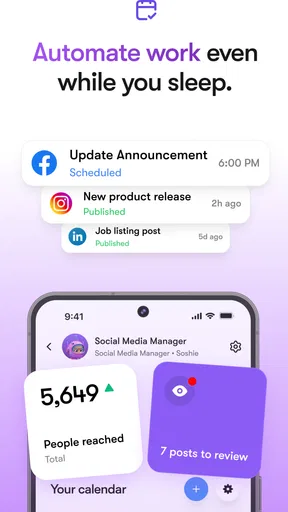
- Task Automation: Automate repetitive tasks like data entry and report generation, freeing up your time for more strategic activities.
- Smart Scheduling: The app can manage your calendar, scheduling meetings and reminders seamlessly.
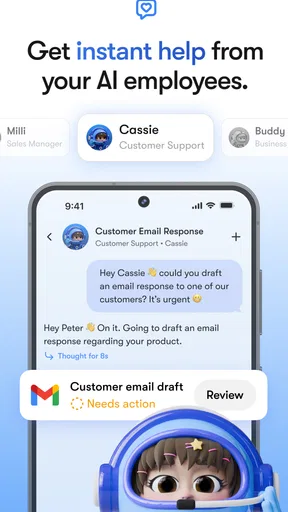
- Email Management: Sintra’s AI can sift through your emails, prioritize them, and even draft responses based on your preferences.
- Data Analysis: Need insights? Sintra can analyze data sets and provide you with actionable insights, saving you hours of number crunching.
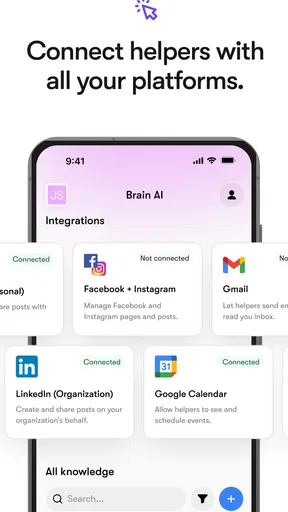
What I appreciated most was the app’s ability to integrate with existing tools like Google Workspace and Microsoft Office 365, making it a versatile addition to any workflow.
Real-World Application
I put Sintra to the test during a busy workweek and was pleasantly surprised. The AI scheduling assistant handled all my meeting requests, ensuring there were no overlaps. Meanwhile, the email assistant prioritized my inbox, allowing me to focus on high-priority tasks. It was like having a personal assistant who never takes a break.
One feature that truly impressed me was the data analysis tool. I uploaded a set of sales data, and within minutes, Sintra had generated comprehensive reports with insightful trends. It’s like having a data analyst on call 24/7.
Is Sintra the Right Fit for You?
So, should you download Sintra? If you’re someone who juggles multiple tasks and often feels bogged down by administrative duties, this app could be a game-changer. It’s not just about efficiency; it’s about giving you the freedom to focus on what truly matters in your work.
Of course, like any tool, its effectiveness depends on how well you integrate it into your workflow. It might take a little adjustment at first, but the payoff in productivity can be significant.
In conclusion, Sintra offers a robust set of features designed to make your work life easier. By automating mundane tasks and providing intelligent assistance, it allows you to reclaim your time and focus on the bigger picture. So, why not give it a try and see if it can help streamline your daily grind?
Pros
- User-friendly interface for easy navigation.
- Highly customizable AI employee profiles.
- Seamless integration with existing tools.
- Efficient task automation and delegation.
- Real-time performance tracking and analytics.
Cons
- Limited offline functionality.
- Requires a strong internet connection.
- Subscription-based model may deter users.
- Occasional lag with high data loads.
- Steep learning curve for new users.
FAQs for Sintra: AI Employees
What is Sintra: AI Employees and how does it work?
Sintra: AI Employees is an innovative app designed to integrate AI-powered virtual assistants into your daily workflow. It helps automate repetitive tasks, schedule meetings, and manage communications. By using advanced machine learning algorithms, Sintra can adapt to your work habits and preferences, optimizing efficiency and productivity.
Is Sintra: AI Employees secure to use for sensitive data?
Yes, Sintra: AI Employees employs robust security measures to protect your data. It uses encryption protocols to safeguard your information and follows industry standards for data protection. Additionally, the app allows you to customize privacy settings, ensuring that sensitive data is only accessible to authorized users.
What platforms are supported by Sintra: AI Employees?
Sintra: AI Employees is available for both Android and iOS platforms. It offers seamless integration across multiple devices, allowing you to access your AI assistant from your smartphone or tablet. The app is designed to be user-friendly and compatible with various operating systems to accommodate different user needs.
What are the main features of Sintra: AI Employees?
The app includes a range of features such as task automation, smart scheduling, email management, and real-time collaboration tools. It also offers integration with popular productivity apps and services, making it a versatile choice for professionals looking to streamline their workflow. The AI learns from user interactions to provide personalized assistance.
Is there a free version of Sintra: AI Employees available?
Sintra: AI Employees offers a free version with limited features, allowing users to explore the basic functionalities of the app. For access to premium features, such as advanced AI capabilities and extended integrations, users can opt for a subscription plan. This flexibility allows users to choose the level of service that best fits their needs.


